Enhancing Crime Scene Documentation with pyLEPhotoLog: A Free and Open-Source Solution for Investigators
Crime Scene Photo Log Generator – A Python 3 GUI application that extracts EXIF metadata from images, generates an MD5 hash, and exports a sorted Excel report for investigative use.


Introduction
Crime scene photography is a critical component of investigations, preserving visual evidence that can be analyzed and presented in court. However, organizing and documenting these photos in a structured, tamper-proof manner can be time-consuming and prone to human error.
To solve this problem, I created pyLEPhotoLog, an open-source Python script that automates crime scene photo documentation, ensuring that investigators can efficiently log photos, extract metadata, and maintain evidence integrity with built-in cryptographic hashing.
Why pyLEPhotoLog Matters for Investigators
Traditional crime scene photo logs often require manual data entry, increasing the risk of errors, inconsistencies, or missing information. pyLEPhotoLog eliminates these challenges by automating metadata extraction and ensuring digital chain-of-custody compliance.
Here’s why this tool is essential for law enforcement and forensic investigators:
1️⃣ Automated EXIF Metadata Extraction
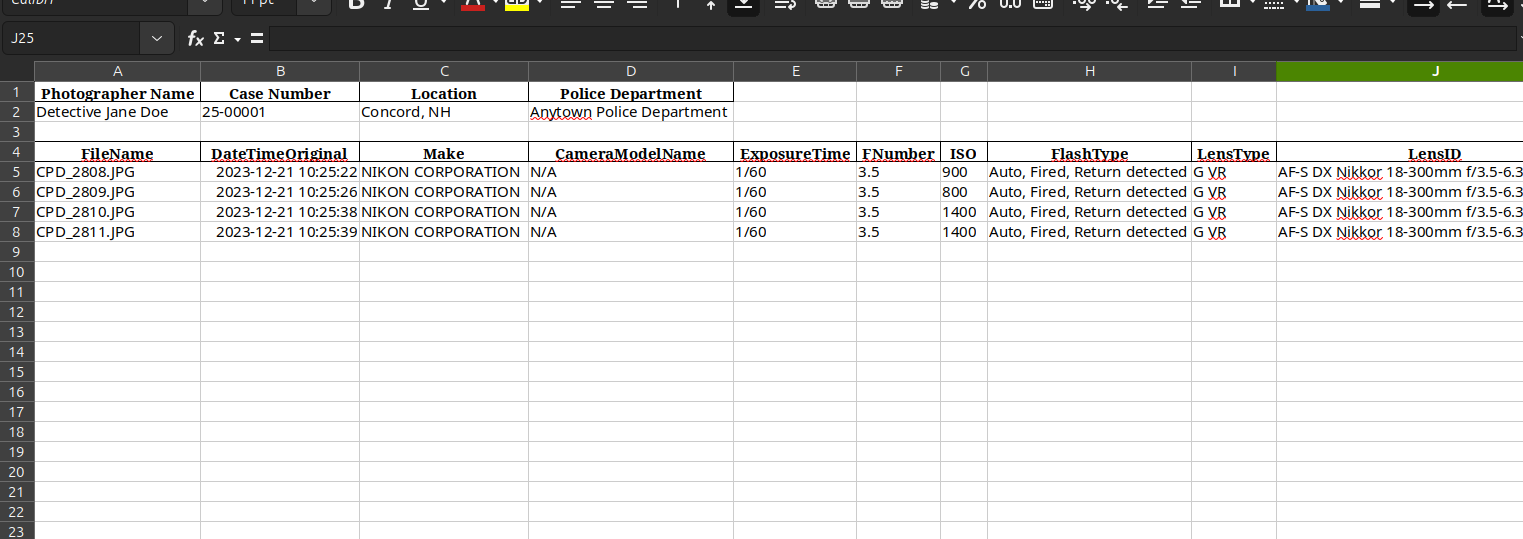
Using exiftool, pyLEPhotoLog extracts crucial metadata from each photo, including:
- Date/Time Original (when the photo was taken)
- Camera Make & Model
- Exposure Settings (ISO, F-Number, Shutter Speed)
- Lens Type & ID
- Flash Information
- GPS Coordinates (if available)
This ensures a comprehensive and accurate record of the crime scene without manual entry.
2️⃣ MD5 Hashing for Evidence Integrity
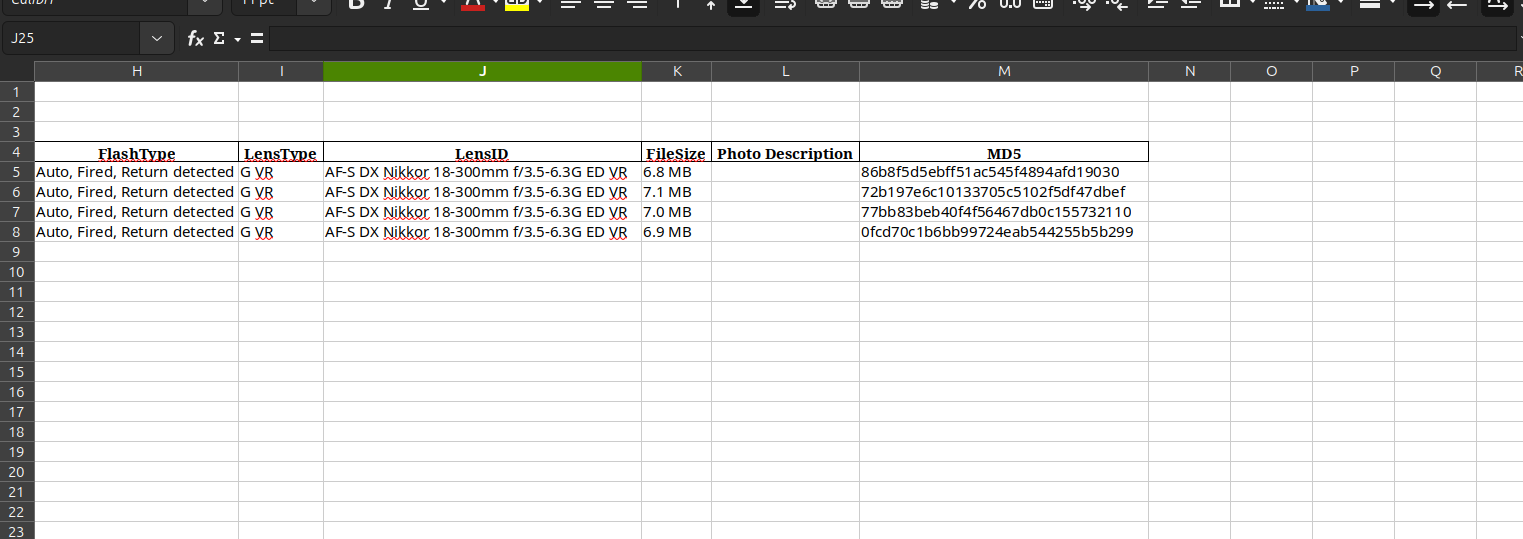
Every image is hashed using MD5, providing a digital fingerprint to detect any unauthorized modifications. This is critical for maintaining evidence integrity in court and ensuring that photos have not been altered.
3️⃣ Organized and Exportable Excel Reports
pyLEPhotoLog compiles all extracted metadata into an Excel (.xlsx) file, allowing investigators to:
✔️ Sort and filter crime scene photos easily
✔️ Add case details (detective name, case number, location)
✔️ Include a custom “Photo Description” field for investigative notes
This structured format saves time, reduces clerical errors, and ensures standardized documentation.
4️⃣ Simple and User-Friendly GUI
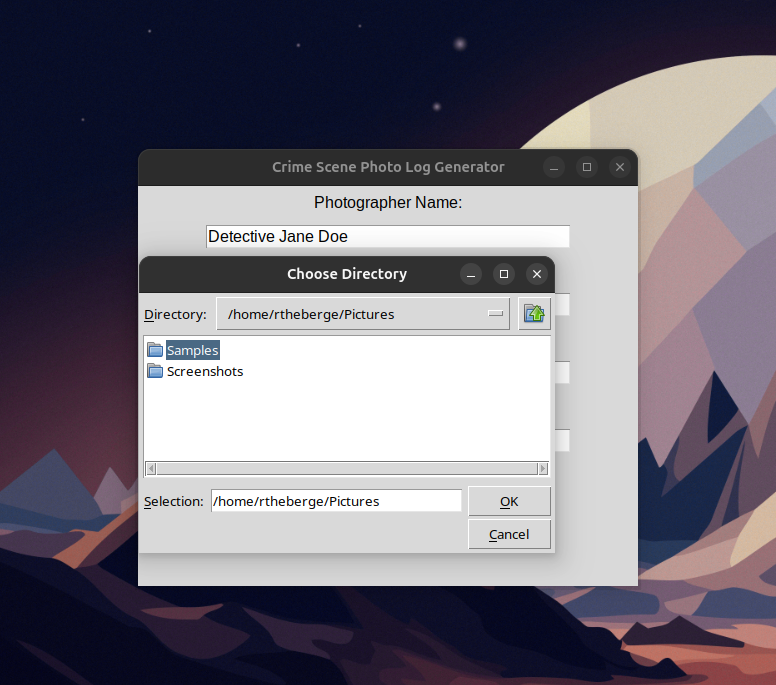
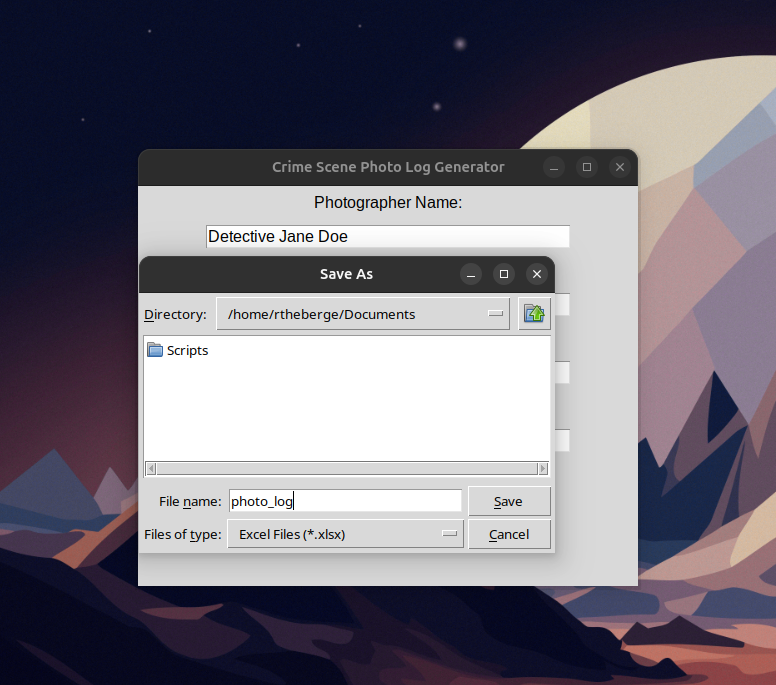
Unlike many forensic tools that require command-line knowledge, pyLEPhotoLog features a GUI that allows any investigator to:
- Select a folder of crime scene images
- Generate an Excel log with metadata and MD5 hashes
- Save the log for reporting and case files
This makes the tool accessible for detectives, forensic analysts, and crime scene photographers.
How to Get and Use pyLEPhotoLog
? Installation Prerequisites
Before running pyLEPhotoLog, ensure you have:
- Python 3.x installed (Download Python)
Debian/Ubuntu Linux (Preferred)
sudo apt install python3
- Required Python libraries (
pandas,openpyxl):shCopyEditpip install pandas openpyxl
Using PIP
pip install pandas openpyxl
Alternate Method
This option works with newer Ubuntu versions:
sudo apt install python3-pandas python3-openpyxl
- ExifTool installed for metadata extraction (Download ExifTool)
Debian/Ubuntu Linux
sudo apt install exiftool
? Running the Script
Clone the GitHub repository and run the script:
git clone https://github.com/iotdetective/pyLEPhotoLog.git
cd pyLEPhotoLog
python pyLEPhotoLog.py
Follow the GUI prompts to generate a crime scene photo log effortlessly.
Screenshots

Why Open Source?
Many forensic software tools are expensive, proprietary, or restrictive. By making pyLEPhotoLog open-source, I aim to provide law enforcement agencies, forensic teams, and legal professionals with a free, accessible, and reliable solution for photo documentation and chain-of-custody tracking.
I encourage feedback, contributions, and feature requests from the community. Investigators who rely on crime scene photography should have the best tools available—without the high price tag.
Conclusion
Crime scene documentation should be efficient, accurate, and verifiable. pyLEPhotoLog streamlines the process, ensuring that investigators can focus on solving cases rather than dealing with manual data entry.
✅ Automatically extracts EXIF metadata
✅ Generates MD5 hashes for evidence integrity
✅ Exports logs in Excel format for easy reporting
✅ Free, open-source, and easy to use
Check it out on GitHub and see how it can improve your investigative workflow:
? https://github.com/iotdetective/pyLEPhotoLog
? What Do You Think?
Would this tool be useful in your investigations? Let me know in the comments or suggest features you’d like to see! ???